Best Pinterest Analytics Tools in 2026

By Ruslan Saifullin, Pinterest analytics developer & founder of Pin Stats • Published September 30, 2026 • Updated October 13, 2026
Key takeaways
- What is the best free Pinterest analytics tool? Pinterest Analytics, for your own pins. It is free with a business account and covers impressions, saves and outbound clicks. For pins you do not own, a browser extension such as Pin Stats shows their public engagement for free.
- Can I see another account's Pinterest analytics? Only public engagement: saves, comments and reactions. Impressions and clicks on someone else's pin are never published, so no tool can show them. The one exception: claim your website, and Pinterest reports on pins other people made from it.
- Which tool shows what happened after the click? Google Analytics 4, on your own site. Tag pin links with UTM parameters so you can tell pins and boards apart, and test one tagged pin first.
- Do I need a paid Pinterest analytics tool? Only for rank tracking or one dashboard across several networks. Most of what a social suite shows for Pinterest comes from Pinterest's own numbers.
- How do I track Pinterest performance over time? Export each month and compare. Pinterest Analytics exports your own pins; Pin Stats Pro exports any board or search as CSV.
One of your pins has thousands of impressions and almost no clicks. A competitor's pin on the same topic keeps turning up at the top of search, and you have no idea how it is doing. Pinterest now has 640 million monthly active users (Pinterest Q2 2026 results, SEC filing), and both of those questions come up for anyone who publishes there. They need different tools.
Most roundups rank Pinterest analytics tools as if they all answer the same question. They do not. This guide sorts them by the two things that decide what a tool can tell you: whose pins it can see, and which number it reports. It covers what each one costs, where each falls short, and a monthly routine that uses three of them.
- TL;DR: which tool answers which question
- The two questions every analytics tool answers
- Pinterest Analytics: your own pins
- Pin Stats: pins you do not own
- Google Analytics 4: what the clicks did
- Paid tools and social suites
- Comparison table
- A monthly Pinterest analytics routine
- Analyzing Pinterest data with ChatGPT or Claude
- How to choose a Pinterest analytics tool
- Frequently asked questions
- Conclusion
TL;DR: Which Pinterest Analytics Tool Answers Which Question
- How did my pins do? Pinterest Analytics. Free with a business account.
- What did the clicks do on my site? Google Analytics 4. Free.
- How are other people's pins doing? The Pin Stats extension. Free to read the numbers; Pro at $21 a year adds any-column sorting, advanced filters and export. Full disclosure: Pin Stats is ours.
- Where do my pins rank for a keyword? A rank tracker such as PinClicks, from $29 a month.
The Two Questions Every Pinterest Analytics Tool Answers
Every analytics tool sits somewhere on two axes. The first is whose pins it can see: only the ones on your own account, or any public pin. The second is which stage it measures: whether a pin was shown (impressions), what people did on the pin (saves, comments, reactions), whether they clicked through (outbound clicks), or what they did after the click (visits, sign-ups, sales). Put the two together and the market sorts itself out.
| Stage | Your own pins | Pins you do not own |
|---|---|---|
| Impressions | Pinterest Analytics | Nobody. Pinterest does not publish them |
| Saves, comments, reactions | Pinterest Analytics | Pin Stats and similar browser extensions |
| Outbound clicks | Pinterest Analytics | Nobody |
| After the click | Google Analytics 4, your shop's reports | Nobody |
| Rank for a keyword | Rank trackers such as PinClicks | The same rank trackers |
The empty cells matter most. No tool shows impressions or clicks on someone else's pin, because Pinterest never publishes them. A tool that seems to show them is estimating. Pin Stats fills exactly one cell in this table: public engagement on pins you do not own.
Pinterest Analytics tells you how your pins did. It cannot tell you how anyone else's did. That second question is where most content decisions start.
Pinterest Analytics: The Right Tool for Your Own Pins
Pinterest's built-in analytics is free with a business account, and for your own pins no other tool is more complete. Every third-party dashboard that reports on your account gets its figures from Pinterest in the first place.
What it measures
- Pin and account performance: impressions, engagements, saves, pin clicks, outbound clicks, follows and video metrics such as views and watch time.
- Audience: total and engaged audience, plus Audience Insights on age, gender, location, device and interests.
- Conversions: checkouts, add-to-cart events and revenue in Conversion Insights, once the Pinterest tag is installed and reporting correctly.
How to use it
The Top Pins view ranks your pins by impressions, engagements, pin clicks, outbound clicks or saves within the date range you pick. You can filter it by content type, device and source, and export the view to CSV. It opens on the last 30 days; widen the range before you draw any conclusion about an evergreen pin.
The claimed-website exception
If you claim your website in Pinterest, Pinterest Analytics also reports on pins that link to it, including pins other people created from your pages. It is the only data about pins you did not make that Pinterest itself gives you, and most roundups never mention it. If you run a blog or a shop, claim the site before anything else on this list.
Where it falls short
It covers your pins and your claimed site only. Recent figures are estimates that can go down as well as up, and Pinterest says data can take about 48 hours to settle, so judge a new pin after a few days rather than a few hours. It cannot show you how any other account's pins are doing.
Pin Stats: For Pins You Do Not Own
Pin Stats is ours, so read this section with the scepticism it deserves. Every claim below can be checked against the features page and the pricing page. Its full name on the Chrome Web Store is Pinterest Pin Stats & Sort, by InsightPins.
What it does
- Numbers on every pin. Saves, repins, likes, comment counts and the creation date on any pin as you scroll, on any account. Free.
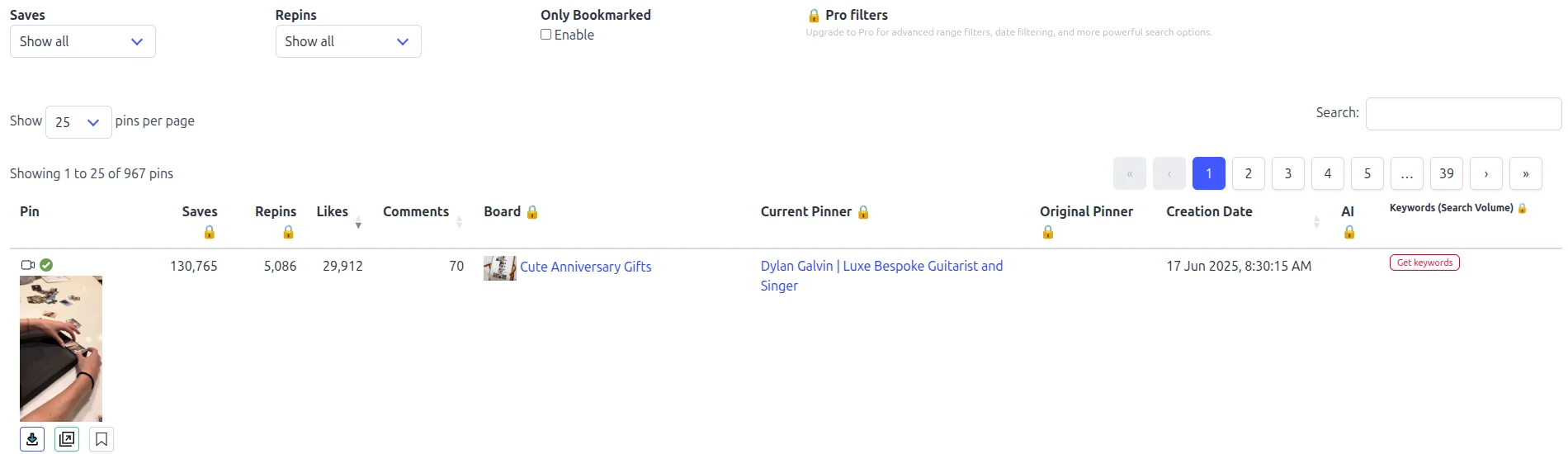
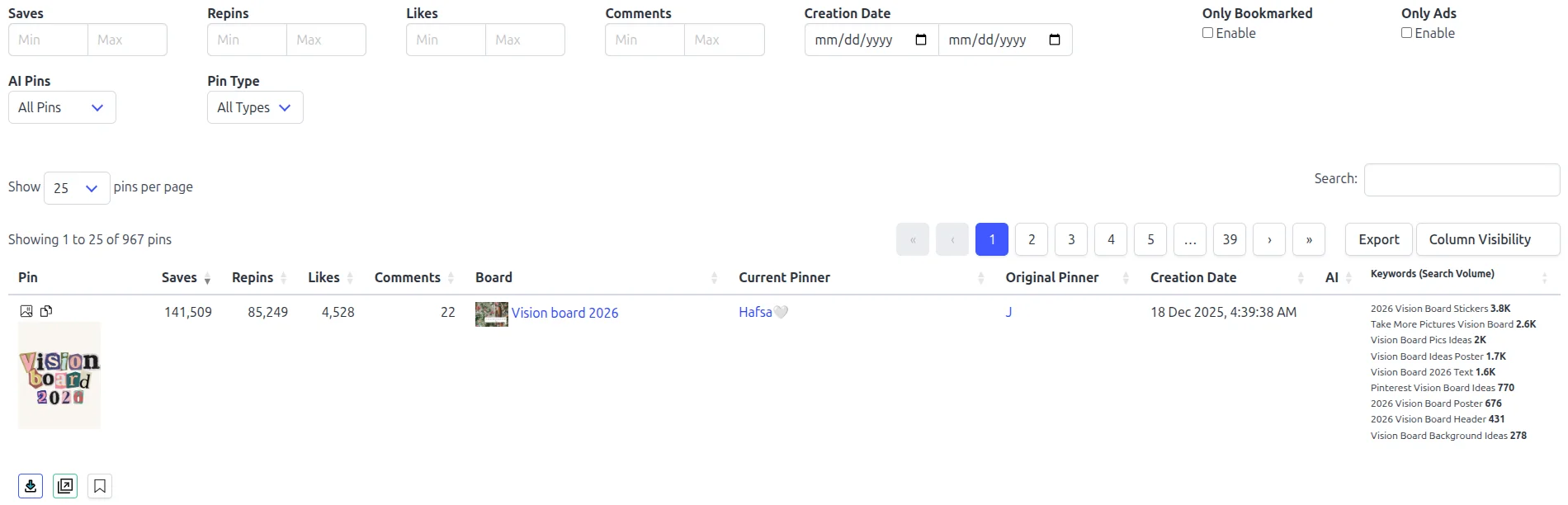
- A table of the whole page. It collects every pin on a board, search or profile into one sortable table. Sorting by likes, comments and creation date is free; sorting by saves, repins and every other column is Pro.
- Filters and export. Advanced minimum and maximum filters, hiding ads and AI-generated pins, and export to CSV or JSON. Pro.
- Keyword volumes per pin. The monthly search volumes of the keywords Pinterest attached to each pin. The first volume is free; all of them are Pro.
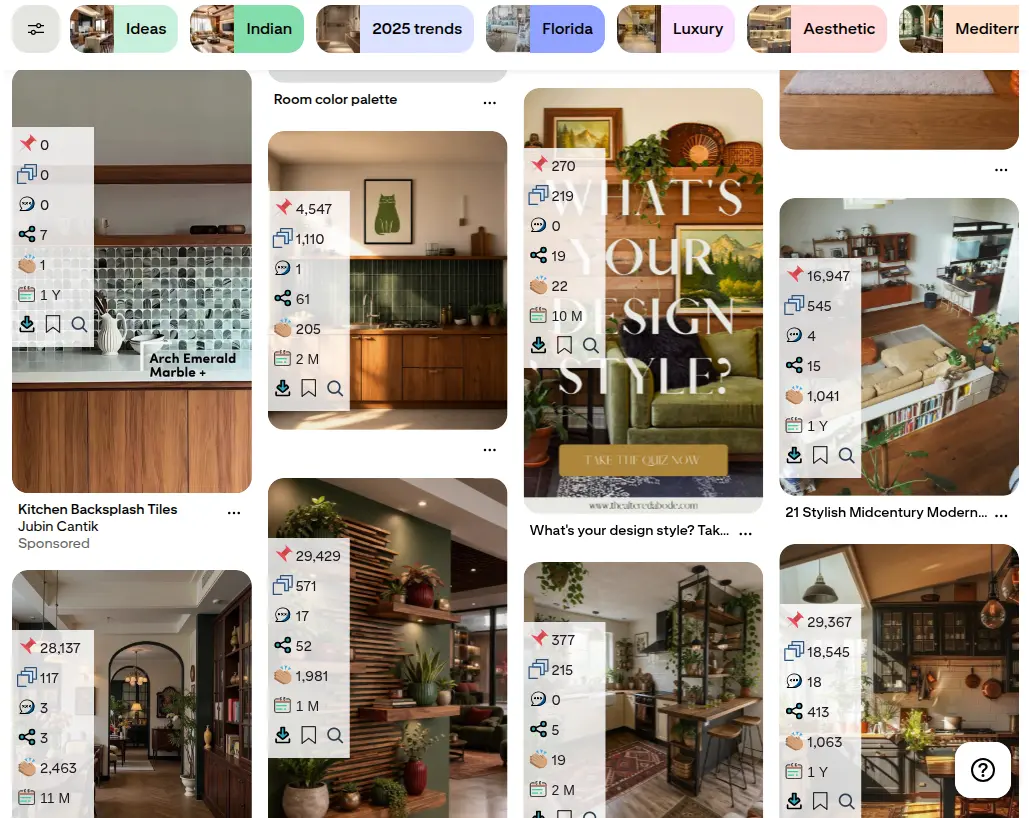
What it costs
Reading the numbers and basic sorting are free. Pro is $21 a year, $6 a month or $45 once, and adds any-column sorting, advanced filters, the ad and AI filter, and export. Extended Pro adds Keyword Explorer, which is keyword research rather than analytics. Paid plans carry a 14-day money-back guarantee.
Here is the same search of 967 pins on each plan.
Where it falls short
Stated plainly: Pin Stats shows no impressions, clicks, sessions, revenue or conversions, for any pin, because those are not public. It does not track pins over time either. Each view is a snapshot, so to see change you export the table each month and compare the files yourself. It has no rank tracking, and it runs in Chrome and other Chromium browsers on desktop only.
Honest alternatives in the same cell
Two other extensions show public numbers on any pin, and it would be odd to leave them out. Keywords Everywhere shows repins, saves, reactions, comments and pin age for free. PinRadar shows a similar overlay for free with a 0 to 100 "viral score", and puts CSV export in Pro at $8 a month, $29 a year or $49 once.
What Pin Stats adds is the whole board, search or profile collected into one sortable table, the advanced filters, the ad and AI filter, and keyword volumes on each pin. If you only ever look at one pin at a time, either alternative will do.
Google Analytics 4: What the Clicks Did
Pinterest can tell you a pin earned an outbound click. It cannot tell you whether that visitor read the post, joined your list or bought something. On your own site, Google Analytics 4 can, and it is the only tool in this guide that sees sign-ups and sales.
Where Pinterest traffic shows up
Untagged visits from Pinterest land in the Organic Social channel, because pinterest.com is on GA4's list of social sources. Visits from the Pinterest mobile app often arrive without a referrer, and GA4 counts those as Direct. So GA4 usually understates Pinterest, and the gap grows the more of your audience uses the app.
Tag your pin links
Pinterest now adds utm_source=Pinterest and utm_medium=Organic to the links on your organic pins by default, and you can switch that off in Business Manager under URL parameters for organic content (Pinterest help). To tell pins or boards apart, add a utm_campaign or utm_content value that names them. Keep your own values lowercase and consistent, or GA4 splits one source into several rows.
Pinterest's help page does not say what happens when a link already carries its own UTM parameters, so do not take it on trust. Tag one pin, click it from the app and from a browser, and check the visit in GA4's real-time report before you tag a hundred.
Paid Pinterest Analytics Tools and Social Suites
Each tool below is described from its own website. Prices were checked in September 2026 and change often, so confirm them before you subscribe.
Tailwind
- Whose pins: your own, through Pinterest's API.
- What it shows: profile, board and pin performance next to its scheduler, so you see results where you plan the next batch. Its scheduling side is covered in our best Pinterest scheduling tools roundup.
- History: free analytics history is not confirmed under the current plans. Before the September 2026 change, paid plans showed up to a year.
- Cost: a free trial: 10 scheduled pins and 5 keyword searches; allowances do not renew monthly. Then plans priced per Pinterest account. Pin Scheduling & Creation is $17.99 a month billed annually, or $29.99 billed monthly; Pinterest SEO and Pinterest Engagement are $11.99 a month each billed annually, or $14.99 monthly. Its older Pro, Advanced and Max plans became legacy plans on September 25, 2026: closed to new subscribers, while existing subscribers keep their terms. Prices from its pricing page, checked October 5, 2026.
PinClicks
- Whose pins: any public pin or account, plus rank tracking for your own keywords.
- What it shows: the top pins for a search, a per-pin lookup it calls "Pin Stats" (unrelated to our extension), an Account Explorer that ranks accounts by public monthly views, and where pins rank for a keyword over time.
- Why use it: rank tracking is the one thing nobody else in this guide does. If you need to know whether a pin moved from position 12 to position 4, this is the tool.
- Cost: Pin Pro is $29 a month or $249 a year and tracks 25 keywords. Pin Plus is $49 a month and tracks up to 5,000 keywords.
Social media suites
If you manage several networks, a suite puts Pinterest next to the others. All of them report on your own accounts only. Metricool includes Pinterest analytics even on its free plan, with paid plans from $20 a month billed annually.
Later starts at $18.75 a month billed annually and keeps 3 months to 2 years of history depending on the plan. Buffer has a free plan and charges $5 per channel a month billed annually. Hootsuite ($99 per user a month) and Sprout Social ($199 per seat a month) are built for teams.
Why suites add less than they seem
Pinterest's API returns only about 90 days of analytics. So when you connect a suite, it can backfill at most the last 90 days. Any longer history it shows you later is history it stored itself after you connected. Metricool, for example, caps its Pinterest sync at 90 days. If you want a long record, your own monthly exports from Pinterest Analytics are often the better one.
Pinterest Analytics Tools Compared
| Tool | Whose pins | Metrics | History | Export | Free tier | Paid from |
|---|---|---|---|---|---|---|
| Pinterest Analytics | Yours, plus pins from your claimed site | Impressions, saves, clicks, outbound clicks, audience, conversions | Adjustable date range; default 30 days | CSV | Free with a business account | - |
| Google Analytics 4 | Visits to your own site | Sessions, engagement, sign-ups, sales | Months to years, by settings | CSV, Sheets | Free | - |
| Pin Stats | Any public pin | Saves, repins, likes, comments, pin age, keyword volumes | None; export to compare | CSV, JSON (Pro) | Numbers on every pin; table sorts by likes, comments or date | $21/yr (Pro) |
| Keywords Everywhere | Any public pin | Repins, saves, reactions, comments, pin age | None | Not advertised | Pin metrics free | Credit plans, for keyword data |
| PinRadar | Any public pin | Saves, repins, likes, comments, viral score, pin age | None | CSV (Pro) | Overlay free | $8/mo, $29/yr or $49 once |
| Tailwind | Yours | Profile, board and pin performance | Free analytics history: not confirmed under current plans; up to 1 year on paid plans before September 2026 | Yes | Free plan | Pro plan; see its pricing page |
| PinClicks | Any public pin; rank tracking for yours | Top pins, public account views, keyword rank over time | Rank history while subscribed | Not advertised | Short trial | $29/mo or $249/yr |
| Metricool | Yours | Pin and account performance next to other networks | Up to 90 days backfilled, then stored | Reports | Free plan includes Pinterest | $20/mo, billed annually |
Third-party features and pricing checked September 2026 from each vendor's website. Plans and prices change often; confirm them on the vendor's site before you buy.
A Monthly Pinterest Analytics Routine That Uses Three of These
Analytics only pays off if you look at it on a schedule and change something as a result. Here is a four-step monthly routine that uses Pinterest Analytics, Google Analytics 4 and Pin Stats. It continues the dinner recipe blog from our keyword research tools guide. The figures in the example are illustrative.
Find your winners in Pinterest Analytics
Open Top Pins for the last 30 days and sort it twice: once by outbound clicks, once by saves. Clicks show which pins send traffic now. Saves show which pins Pinterest is likely to keep distributing, because a save puts the pin on another board where more people can find it.
Worked example · the dinner recipe blog
The blogger's top pin by outbound clicks is a cheap dinner ideas roundup. The top pin by saves is a single sheet-pan recipe with a step-by-step image, which gets saved often but clicked rarely.
Follow the clicks into Google Analytics 4
Filter GA4's traffic acquisition report to Pinterest and look at the landing pages those clicks reached. A pin that earns clicks to a page nobody stays on is a page problem, not a pin problem.
Worked example · the dinner recipe blog
The roundup's visitors read on and a good share join the newsletter. The sheet-pan recipe's few visitors leave quickly, because the pin already showed every step. The blogger keeps the roundup format and shows less of the method on the next recipe pin.
Benchmark the niche with Pin Stats
Your own numbers only tell you how you did against yourself. To see what works in your niche, search your main keyword on Pinterest and read other people's pins with the free Pin Stats extension. Look at the saves and creation dates of the top results, then compare their formats with your own top pins. Our Pinterest competitor analysis guide walks through the full method.
Worked example · the dinner recipe blog
In the search for cheap dinner ideas, several pins from this year already have hundreds of saves, and most are collages of four to six dishes with a price in the title. The blogger's roundup pin used one photo. Next month's version gets a collage and a price.
Keep your own history
Neither Pin Stats nor Pinterest's API keeps a long record for you. Once a month, export your Pinterest Analytics report and, on Pin Stats Pro, the table for your main search, then drop both into a spreadsheet with the date in the file name. After three months you have a trend no tool in this list would have given you.
How to Analyze Pinterest Analytics with ChatGPT or Claude
Neither ChatGPT nor Claude can open your Pinterest Analytics on its own. They read what you export. That still covers the slow part of a monthly review: ranking pins by more than one metric, working out rates such as saves per 1,000 impressions, matching pins to the GA4 landing pages they sent visitors to, and writing up what changed since last month. What an assistant cannot do is fill a gap in the data. It has no impressions or clicks for pins you do not own, because nobody publishes them.
ChatGPT or Claude: which to use for each job
| Job | ChatGPT | Claude | Pick |
|---|---|---|---|
| Rank your pins from a Pinterest Analytics export | Yes, attach the CSV | Yes, attach the CSV | Either |
| Work out rates, such as saves per 1,000 impressions | Yes, by running code on the file | Yes, by running code on the file | Either; ask it to use code, not mental arithmetic |
| Match pins to GA4 landing pages | Yes, from the two exports | Yes, from the two exports | Either |
| Chart the month for a report | Yes | Yes | Either |
| Compare this month with last month | A project holding both months' files | A project holding both months' files | Either |
| Show impressions or clicks for someone else's pins | No | No | Neither: no tool can |
Features as described in October 2026. Both assistants change often; check before you build a routine on one feature.
Use the one you already pay for. Both read a CSV and run code on it. What decides the result is whether you attach the right exports.
Three prompts to copy
Replace everything in square brackets. Each prompt works in either assistant.
Attached is my Pinterest Analytics export of my top pins for [date range].
Calculate with code, not by eye:
1. The top 10 pins by outbound clicks and the top 10 by saves. Which pins are on both lists?
2. For each pin: saves per 1,000 impressions and outbound clicks per 1,000 impressions
3. Up to 5 pins with many impressions but few saves and clicks
4. What the top pins have in common (topic, format, title wording), judged from the titles and links in the file
Use only the columns in the file and name the ones you used. If a metric is missing, say so instead of estimating it.I am attaching two files for [date range]:
- My Pinterest Analytics export: each pin with its link and outbound clicks
- My GA4 landing page report filtered to session source "pinterest": landing page, sessions, engaged sessions, key events
Match each pin to its landing page by URL, ignoring utm parameters and trailing slashes.
1. Which pages keep Pinterest visitors (engaged sessions / sessions), and which lose them?
2. Which pins send many clicks to pages with a low engagement rate?
3. List any pin whose link matches no row in GA4.
Use only the numbers in the files. GA4 counts some Pinterest app visits as Direct, so expect its totals to be lower than Pinterest's outbound clicks.File 1: my pins about [topic], from Pinterest Analytics, with their titles and saves.
File 2: the top Pinterest results for "[keyword]", with each pin's title, saves, repins and creation date.
Saves are the only metric both files share, so compare only saves, and keep in mind how old each pin in file 2 is.
1. How do my pins' saves compare with the top results of a similar age?
2. Which formats and title patterns appear among the top results but not among my pins?
3. Suggest 3 changes for next month's pins on this topic.
Do not estimate impressions or clicks for the pins in file 2: they are not public.Prompt 3 needs numbers Pinterest Analytics does not have: other people's pins. With the free Pin Stats extension, note the saves, repins and creation date of the top 15 to 20 pins as you scroll. On Pin Stats Pro you can export the whole search as a CSV and attach the file instead.
Prompt, project or connector: which to set up
- A prompt is enough for a one-off review. Copy one of the three above.
- A project suits the monthly routine, in either assistant, and it is the easy way to keep your own history. Each month, add the Pinterest Analytics export, the GA4 report and, on Pro, the Pin Stats export to one ChatGPT or Claude project, with the month in each file name. Then ask what changed since last month. The assistant compares the files; it still knows only what you saved.
- A connector (MCP) lets an assistant fetch data itself. Google publishes an experimental, read-only Google Analytics MCP server that runs on your own computer and lets an MCP client such as Claude Code query your GA4 property. Setting it up takes a Google Cloud project and the command line, so it suits developers; for everyone else, exporting the report is quicker. For Pinterest, use only a service that connects through Pinterest's official API and asks for access on Pinterest's own login screen, never one that asks for your password.
How to Choose a Pinterest Analytics Tool
Run anything you are considering through five checks before you pay for it.
- Whose pins it covers. Your own account, or any public pin. A tool built for one cannot answer questions about the other.
- Which numbers are real. Impressions and clicks on pins you do not own are never public. If a tool shows them, ask how it estimates them.
- How much history it keeps. Pinterest's API returns about 90 days. Anything longer is stored by the tool itself, from the day you connected.
- Whether you can export. A CSV you own outlives any subscription and lets you compare months side by side.
- Whether the price fits your volume. If you publish a few pins a week, the free tools above cover most of it. Pay when a free tool becomes the bottleneck.
Comparing the browser extensions specifically? Our best Pinterest Chrome extensions guide covers what each one is allowed to access and how to vet it.
Frequently Asked Questions
Can I see analytics for someone else's Pinterest pins?
Only their public engagement: saves, repins, reactions, comments and the date the pin was created. Pinterest shows some of these on the pin, and a browser extension such as Pin Stats shows all of them on any pin and collects a whole search into a table.
Why can't I see impressions on a competitor's pin?
Because Pinterest only reports impressions and clicks to the account that owns the pin. They are never published, so no tool can read them. A tool that shows them for someone else's pin is estimating.
Is Pinterest Analytics enough on its own?
For your own pins, it covers almost everything, and it is free. It cannot show what visitors did on your site, which needs Google Analytics 4, or how anyone else's pins are doing, which needs a tool that reads public pin data.
Does Pin Stats track my pins over time?
No. Pin Stats shows each pin's current public numbers and does not keep a history. To see change, export the table on Pro each month and compare the files in a spreadsheet.
How do I track Pinterest traffic in Google Analytics?
Pinterest adds utm_source=Pinterest and utm_medium=Organic to organic pin links by default, so filter GA4's traffic acquisition report to Pinterest and look for Pinterest / Organic as well as pinterest.com / referral. Untagged visits from the Pinterest app can still appear as Direct. To tell pins apart, add a utm_campaign value to the link, and test one tagged pin first.
Can ChatGPT or Claude analyze my Pinterest analytics?
Yes, from an export. Download the CSV from Pinterest Analytics and attach it, and either assistant can rank your pins, work out rates and, with last month's files in a project, say what changed. Neither can log in to Pinterest for you, and neither can show impressions or clicks for pins you do not own.
Conclusion: Match the Tool to the Question
| If you need to know | Use |
|---|---|
| How your pins performed | Pinterest Analytics |
| How other people's pins from your site performed | Pinterest Analytics, after claiming your website |
| What Pinterest visitors did on your site | Google Analytics 4, with UTM-tagged pin links |
| How other people's pins are doing | Pin Stats, or another extension that reads public pin data |
| Where your pins rank over time | A rank tracker such as PinClicks |
Start free. Once a month, find your winners in Pinterest Analytics, follow their clicks into GA4, read the pins that lead your niche with Pin Stats, and save both exports so you build your own history. Pay for more only when a free tool becomes the bottleneck.
No single Pinterest analytics tool sees everything, and none ever will, because Pinterest keeps some numbers to the pin's owner. Knowing which number each tool can see is most of the job.
Next step: install Pin Stats for free, search your niche's main keyword on Pinterest and read the saves on the top results. It is the part of the picture your own analytics cannot show you.